
Như bạn có thể biết, hầu hết các nhà cung cấp dịch vụ lưu trữ có uy tín hiện nay đều bao gồm các công cụ cài đặt WordPress tự động như MOJO, Softacificent, v.v. Tuy nhiên, các công cụ tự động này có thể không khả dụng vào nhiều thời điểm, điều này có thể gây nản lòng.
Trong bài đăng này, Kensfi sẽ hướng dẫn bạn các bước để cài đặt thành công WordPress bằng tay bằng cách sử dụng cPanel của bạn, lưu ý bạn chỉ nên thực hiện nếu công ty thiết kế web không hỗ trợ bạn, trường hợp nếu bạn sử dụng dịch vụ của công ty Thepixelboutique thì có thể nhờ hỗ trợ hoàn toàn miễn phí. Nếu bạn muốn tự quản trị và cài đặt, hãy tham khảo ngay bài chia sẻ dưới đây.
1. Tải về WordPress
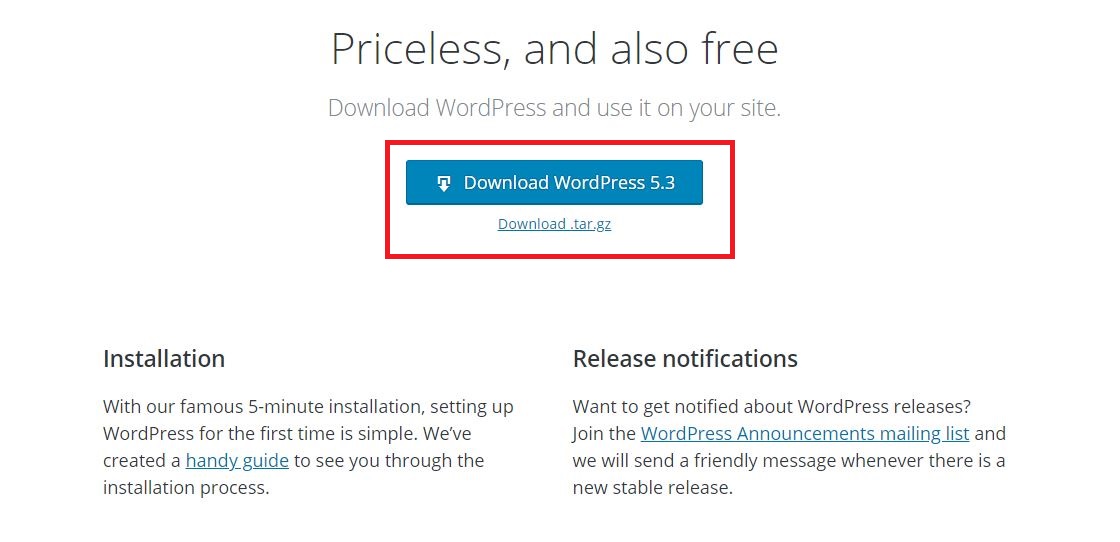
Tìm kiếm trên Google: WordPress download, hoặc vào thẳng trang download của WordPress tại đây: wordpress.org/download/. Tải về phiên bản mới nhất.
2. Tải lên và giải nén tệp WordPress .ZIP vào thư mục cài đặt mong muốn của bạn
Được rồi vì vậy tại thời điểm này tôi giả sử rằng bạn đã có một nhà cung cấp dịch vụ lưu trữ bằng cPanel và bạn đã tạo một Tên miền (domain) bổ trợ hoặc Thư mục con.
Trong Trình quản lý tệp, định vị và điều hướng đến thư mục đó. Từ thanh công cụ trên cùng của cPanel, chọn Tải lên Tải lên và duyệt tìm tệp bạn đã tải xuống từ WordPress.org. Khi tệp .ZIP đã tải lên xong, hãy quay lại thư mục bằng cách nhấp vào liên kết “← Go Back to “/home/yourserverhere/public_html/yoursitehere”.
Trong thư mục gốc, bây giờ bạn sẽ thấy tệp wordpress.zip. Nhấp vào tập tin này để chọn nó và sau đó từ thanh công cụ cPanel ở trên cùng, nhấp vào trích xuất. Sau đó bấm vào Tải lại tải lại trên thanh công cụ cPanel và bạn sẽ thấy thư mục wordpress được giải nén. Bây giờ bạn có thể xóa tệp .ZIP để giữ mọi thứ tốt đẹp và sạch sẽ.
3. Di chuyển các tập tin từ thư mục cài đặt WordPress trở lại thư mục gốc
Nhấp đúp chuột vào thư mục WordPress mới được giải nén và bây giờ bạn sẽ thấy tất cả các tệp WordPress. Từ thanh công cụ cPanel, nhấp vào ô “Select All. Tất cả các tệp WordPress bây giờ sẽ được làm nổi bật. Trong thanh công cụ cPanel, hãy chọn “Move File” và một phương thức sẽ bật lên với một thư mục liên kết là “/public_html/yourdirectoryname/wordpress” từ đầu đường dẫn và nhấp vào “Move file (s)”.
Bây giờ tất cả các tệp sẽ được chuyển đến thư mục gốc của bạn và nhấp vào Up Up Một cấp độ từ thanh công cụ để xem chúng.
4. Tạo cơ sở dữ liệu và người dùng cơ sở dữ liệu WordPress
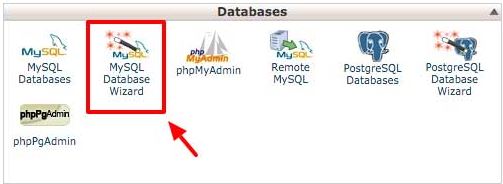
Chúng tôi đã hoàn thành các bước ban đầu và bây giờ là thời gian để thiết lập cơ sở dữ liệu sẽ cung cấp năng lượng cho trang web của bạn. Điều hướng đến bảng điều khiển chính cPanel của bạn và xác định vị trí / nhấp vào biểu tượng “MySQL Database Wizard”.
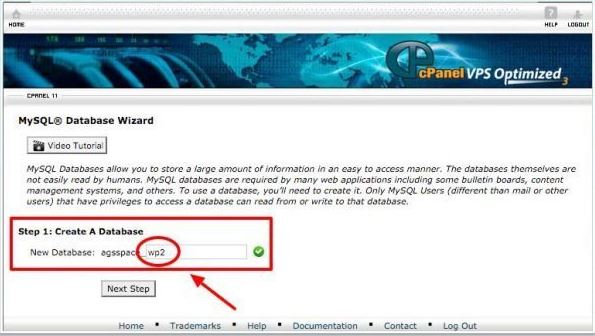
Khi đã ở trong Trình hướng dẫn cơ sở dữ liệu, bạn sẽ được nhắc tạo Cơ sở dữ liệu mới. Tiền tố cơ sở dữ liệu của bạn sẽ xuất hiện theo sau bởi một dấu gạch dưới và một vùng trống để bạn điền tên “yourserver_blankarea“. Trong khu vực trống, bạn sẽ nhập tên cơ sở dữ liệu của bạn và giữ nó ở một nơi an toàn cho một bước trong tương lai. Tên cơ sở dữ liệu phải có ít nhất 3 ký tự và chỉ chứa các ký tự chữ và số. Sau khi điền tên, hãy nhấp vào “next step”.
Bây giờ bạn sẽ được nhắc để tạo Database User. Tiền tố cơ sở dữ liệu của bạn sẽ xuất hiện một lần nữa theo sau là dấu gạch dưới và một vùng trống để bạn điền tên “yourserver_username“. Tên người dùng cơ sở dữ liệu không thể chứa nhiều hơn bảy ký tự chữ và số. Lưu tên người dùng vào một vị trí an toàn để sử dụng trong tương lai. Bây giờ, hãy nhập thủ công mật khẩu theo lựa chọn của bạn hoặc sử dụng “Password Generator” được cung cấp, chỉ cần đảm bảo rằng mật khẩu của bạn mạnh và an toàn. Bây giờ bấm vào nút “Create User”.
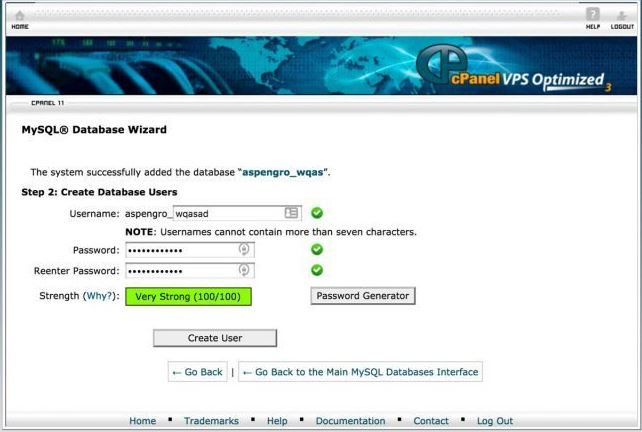
Bây giờ bạn đã tạo Người dùng cơ sở dữ liệu, bạn sẽ được đưa đến một trang yêu cầu bạn gán các đặc quyền. Đánh dấu vào ô ở trên cùng, đọc dòng chữ Tất cả các đặc quyền và sau đó nhấp vào nút Phần tiếp theo Bước. Cơ sở dữ liệu của bạn hiện đã được thiết lập và bây giờ bạn có thể chuyển sang cắm thông tin cơ sở dữ liệu vào tệp wp-config.php.
5. Nhập tệp wp-config.php với thông tin cơ sở dữ liệu của bạn
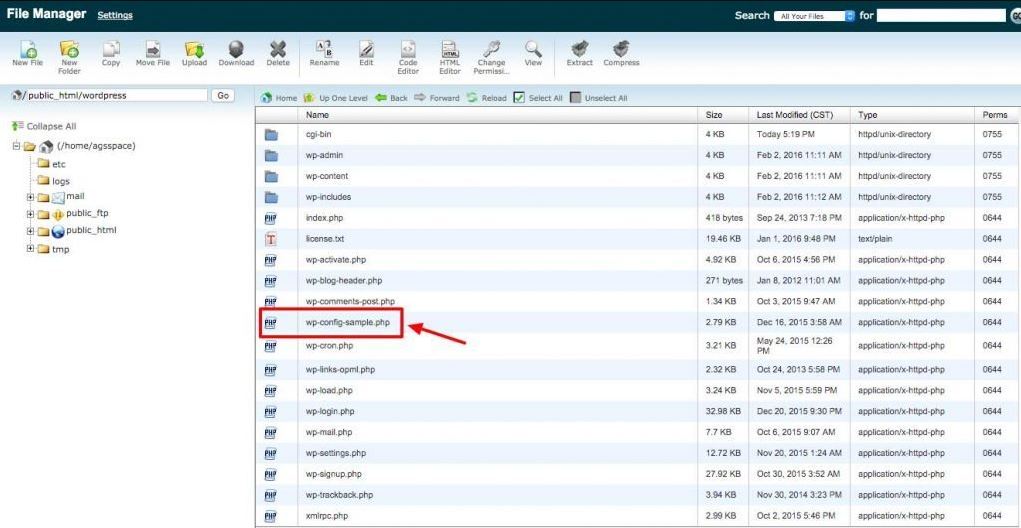
Được rồi, bây giờ là lúc để điều hướng trở lại thư mục thích hợp trong trình quản lý tệp với thông tin cơ sở dữ liệu của bạn tiện dụng. Trong thư mục gốc của trang web của bạn, hãy xác định vị trí tệp có tên là wp-config-sample.php. Nhấp vào tập tin này và sau đó chọn “Code Editor” từ trên thanh công cụ trên cùng, nhấp vào “Edit” và mở tệp .php.
6. Thay thế Unique Keys and Salts mặc định
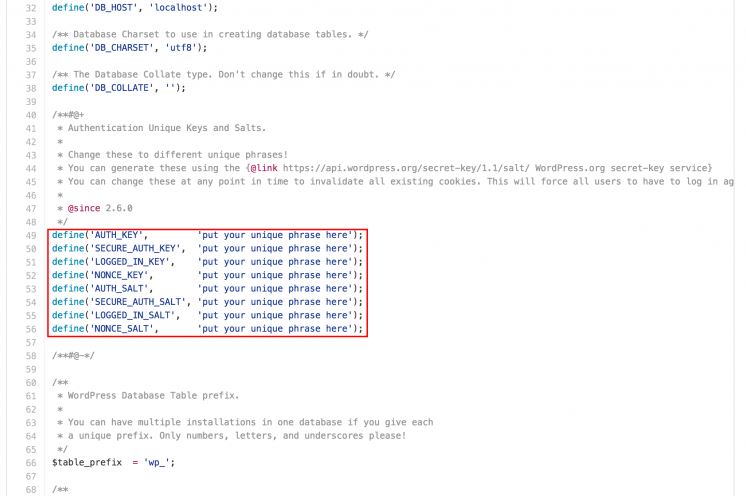
Với tệp wp-config-sample.php của bạn vẫn mở trong Trình chỉnh sửa mã, hãy điều hướng đến phần có thể đọc khóa “*Authentication Unique Keys and Salts”. Truy cập vào WordPress Unique Phrase và Salt Key generator tại đây >>https://api.wordpress.org/secret-key/1.1/salt/. Sao chép Unique Phrase và Salt Keys được tạo bởi API WordPress và thay thế các cụm từ mặc định nằm trong tệp wp-config-sample.php. Khi bạn đã hoàn thành việc đó, hãy nhấn vào “Save” và thoát khỏi Code Editor và quay lại thư mục gốc.
7. Đổi tên “wp-config-sample.php” thành “wp-config.php”
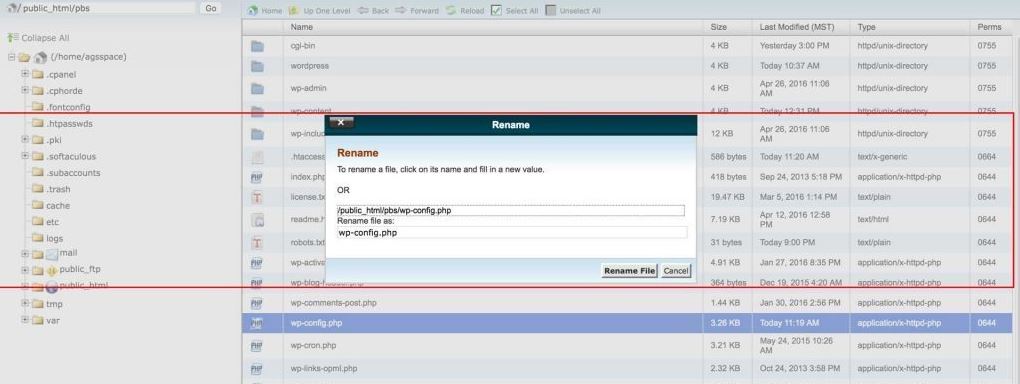
Bây giờ bạn đã quay lại thư mục gốc root, chỉ cần nhấp vào tệp wp-config-sample.php để tô sáng nó. Từ đó, nhấp vào biểu tượng “Rename” trên thanh công cụ trên cùng và đổi tên thành wp-config.sample.php. Nhấp vào nút “Rename File” và đổi tên, vậy là bạn đã hoàn thành giai đoạn này.
8. Chạy tập lệnh cài đặt WordPress
Bây giờ là lúc để chạy Tập lệnh cài đặt WordPress bằng cách truy cập liên kết này tại đây >> hoặc tập lệnh được cung cấp trên Bảng cheat PDF.
Khi bạn đã truy cập vào liên kết cho Tập lệnh cài đặt, bạn sẽ được đưa đến một trang có URL URL https://example.com/wp-admin/install.php. Thay thế ví dụ về.com.com.com bằng địa chỉ trang web bạn đang tạo. Nhấn Return / Enter trên bàn phím của bạn và quá trình cài đặt sẽ bắt đầu.
Khi bạn đã đến màn hình tiếp theo, hãy chọn ngôn ngữ lựa chọn cho cài đặt WordPress của bạn và nhấp vào Tiếp tục.
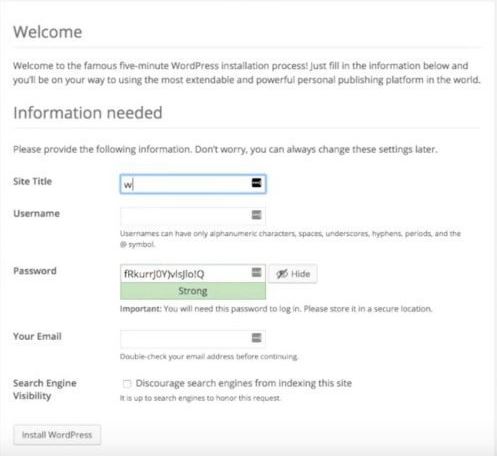
Sau đó, bạn sẽ được đưa đến một trang nhắc bạn nhập tất cả các trang web của bạn Thông tin thích hợp như tiêu đề trang web, tên người dùng, mật khẩu và địa chỉ email của bạn. Nếu bạn đang phát triển một trang web mới tại địa chỉ này, bạn cũng nên đánh dấu vào ô hộp Không khuyến khích các công cụ tìm kiếm lập chỉ mục trang web này vì vậy Google, Bing, v.v. không lập chỉ mục trang web của bạn trước khi nó được điền nội dung và sẵn sàng ra mắt.
Đọc thêm:>>>Tổng hợp 10 theme wordpress blog cá nhân nổi bật năm 2019<<<
9. Tùy chỉnh giao diện cho website WordPress
Sau khi hoàn tất quá trình cài đặt, bạn có thể sẽ cần tùy chỉnh giao diện của web để tạo ra trang thương hiệu riêng cho mình, có thể chỉnh trực tiếp trên source code của hosting, tuy nhiên chúng tôi khuyên bạn không nên làm như vậy mà bạn nên tải những file mà bạn muốn chỉnh sửa xuống (update lần nào thì tải lần đó) để chỉnh sửa trên các phần mềm IDE (tham khảo thêm các phần mềm hỗ trợ code tại http://free-php-editor.com/).
Sau khi hoàn thành việc chỉnh sửa và chạy thử demo giao diện trên máy tính. Lúc này bạn mới nên up toàn bộ source code ngược trở lại trên hosting, như vậy sẽ hại chế những lỗi cũng như thao tác sai và không thể hoàn toàn tác trên môi trường hosting.
Trên đây là những chia sẻ của chúng tôi về cách up WordPress lên cho website của bạn, hy vọng những chia sẻ của chúng tôi có thể giúp bạn tạo được những trang web đơn giản với mã nguồn WP này.